 ComingUp
Gallery
About
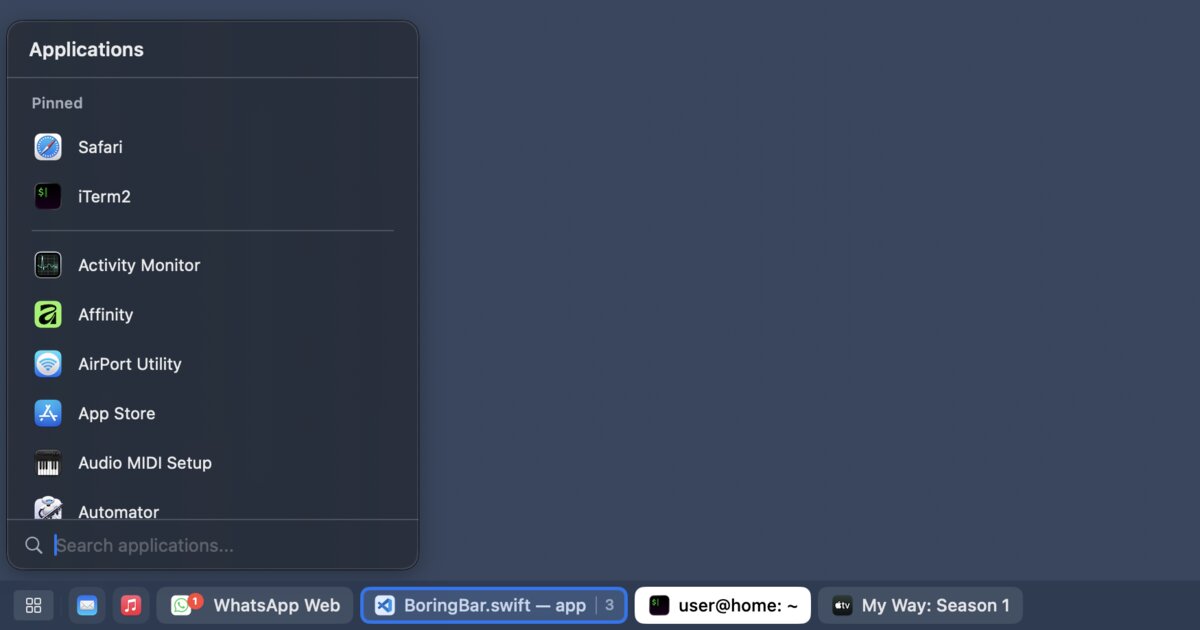
Hi HN!I recently switched from a Fedora/GNOME laptop to a MacBook Air. My old setup served me well as a portable workstation, but I’ve started traveling more while working remotely and needed something with similar performance but better battery life. The main thing I missed was a simple taskbar that shows the windows in the current workspace instead of a Dock that mixes everything together.I built boringBar so I would not have to use the Dock. It shows only the windows in the current Space, lets you switch Spaces by scrolling on the bar, and adds a desktop switcher so you can jump directly to any Space. You can also hide the system Dock, pin apps, preview windows with thumbnails, and launch apps from a searchable menu (I keep Spotlight disabled because for some reason it uses a lot of system resources on my machine).I’ve been dogfooding it for a few months now, and it finally felt polished enough to share.It’s for people who like macOS but want window management to feel a bit more like GNOME, Windows, or a traditional taskbar. It’s also for people like me who wanted an easier transition to macOS, especially now that Windows feels increasingly user-hostile.I’d love feedback on the UX, bugs, and whether this solves the same Dock/Spaces pain for anyone else.P.S. It might also appeal to people who feel nostalgic for the GNOME 2 desktop of yore. I started my Linux journey with it, and boringBar brings back some of that feeling for me.
Comments (0)
No comments yet. Be the first to comment!
Related Products

Lynxify.me
360-degree feedback software for small teams

ThinkSpatial

Free Knitting Calculators: Gauge, Decrease & Yarn Tools (AI-Enhanced) | StitchMa
Bookmark AI
Browser extension and dashboard to auto-tag and AI-search saved YouTube videos

IdeaGrit
pressure-tests your idea and helps you commit to the right hard thing.
RentalReady — Turnover Tracker
Turnover checklist and inspection tracker for short-term rental hosts.