 ComingUp
FinalHelpDesk PRO
AI helpdesk in 6 languages: Outlook, knowledge, automation & source code.

Gallery
About
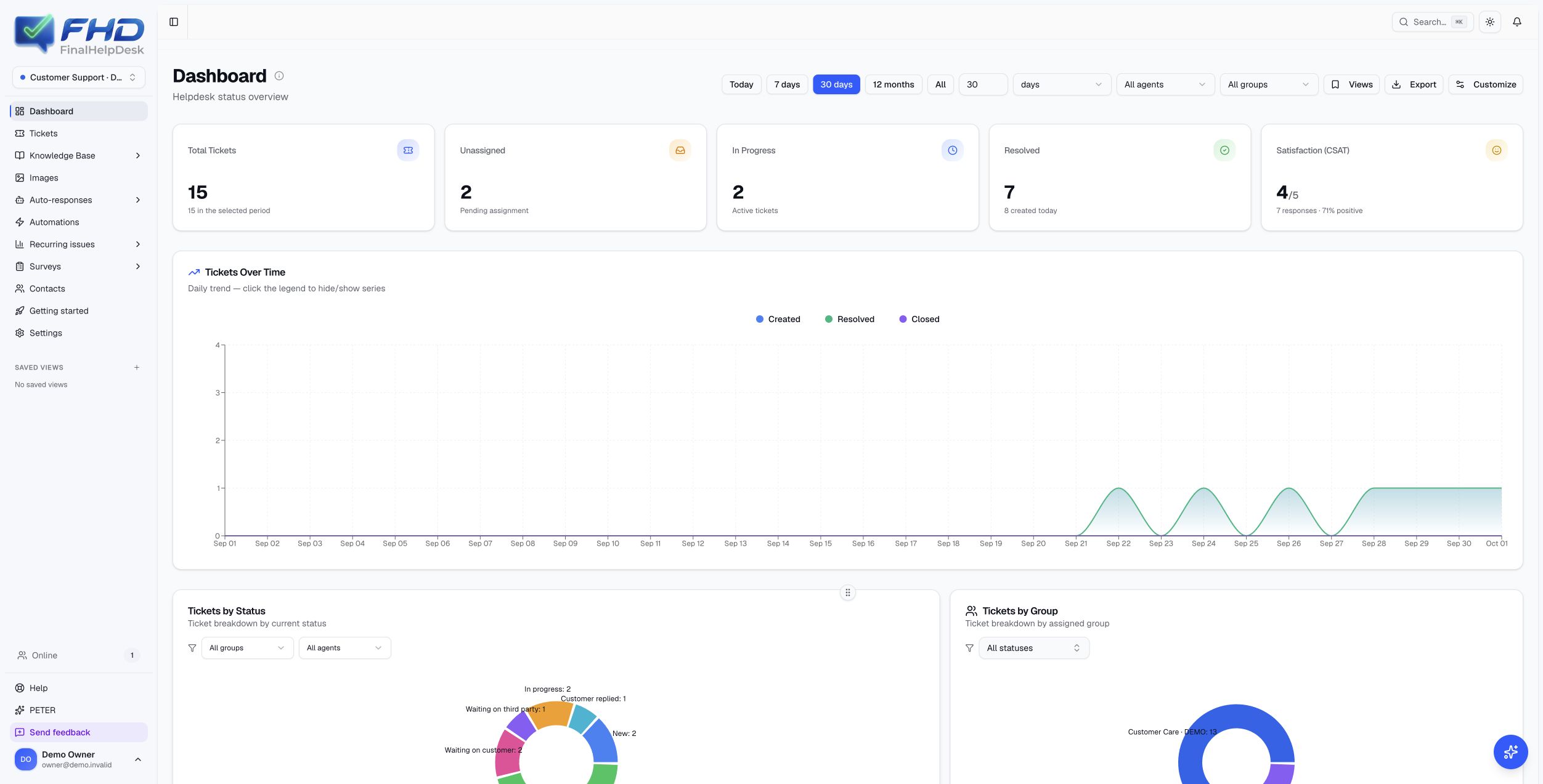
Own the platform behind your next support offering.Six interface languages. English, Spanish, French, German, Italian and Portuguese, with language preferences for each user. Screenshots show the English interface.FinalHelpDesk PRO brings the support conversation, the knowledge behind the answer and the controls around AI into one application. Acquire the source code and build on a product that connects ticket operations, Microsoft 365, knowledge management, automation, service levels and customer feedback.The opportunity is a one-time acquisition of the PRO software assets for a buyer with a technical team: a Microsoft 365 integrator, managed service provider, support specialist or B2B software company. Deploy under your own accounts, adapt the product to your market and take over its future development.Six capabilities to build on• Evidence-backed AI assistance. A separate verifier, knowledge excerpts, human corrections and configurable checks before automatic replies.• A knowledge improvement workflow. Turn conversations into articles, review updates, find duplication and preview AI-assisted merges.• Configurable document review. Classify attachments, apply your own validation rules and inspect structured findings and quoted evidence. Delivered empty and disabled for the buyer’s own rules.• Microsoft 365 integration. Connect support mailboxes, preserve conversations and extend agent workflows through Teams, Linear and the public API.• Coordinated support operations. Per-instance configuration, assignment, follow-ups, working-calendar SLAs, customer feedback and recurring-issue analysis.• Software assets for your own offering. Acquire the agreed PRO source release and operate under your own accounts, with deployment licensing, AI seats and optional Stripe billing components.The detailed inventory below explains the workflows, configuration requirements and delivery scope.Explore the platformTickets & collaboration / dashboards & contacts / knowledge / AI providers / review & automatic replies / document validation / automations / SLA / customer feedback / integrations / administration / commercial foundations.01 · A complete ticket workspaceKeep the conversation, ownership and next action together.• Email-created and manually created tickets, including internal cases; configurable statuses, four priority levels, categories and subcategories; assignment to agents and groups, with customer and company context alongside the case.• A searchable, sortable and paginated ticket list with combined status, priority, agent, group and category filters, visible filter chips and inline changes. VIP, linked knowledge, AI reply, customer-sentiment and resolution signals when available, and SLA indicators keep useful context in the queue.• Save private, selected-user or organisation-wide views, choose defaults, reorder views and see ticket counts in the sidebar. Open several cases in reorderable internal tabs without abandoning the current conversation.• An email conversation workspace with sender/recipient details, timestamps, collapsible quoted history, inline images and downloadable attachments. Copy the ticket code and move directly to the next case.• Compose and forward replies with To, CC and BCC controls, contact autocomplete, recipient chips that move between fields, additional commentary and outgoing attachments.• The rich text editor includes text formatting, colour and size, numbered and bulleted lists, editable tables and resizable images. Insert images from a URL or the library, or paste and drag them into the message.• Internal notes with authors and timestamps, optional colleague notifications, ticket history and saved reply/note drafts preserve the working context when switching between tickets.• Viewer avatars and concurrent-viewing warnings show when another agent is in the case; an additional confirmation before sending helps the team coordinate. Reply/send, reply-and-resolve and reply-with-note actions reduce repeated steps.• Merge related tickets, move cases between permitted instances, delete selected cases in bulk and reopen resolved or closed tickets. Genuinely new incoming customer replies reopen resolved or closed conversations; per-instance lifecycle settings govern assignment requirements and reply-status choices.• Turn a conversation into knowledge: select the messages and notes to use, provide generation instructions, review similar articles and choose to create, update or replace an article.• Import existing tickets from CSV or JSON with a CSV preview and row-level results; supported historical fields and contacts are retained. Export ticket records to CSV, Excel or Word, subject to documented batch and export limits.02 · Dashboards, contacts and team organisationGive agents their working view and managers an operational overview.• Personalise the dashboard by showing, hiding and dragging widgets; save the layout or restore its defaults. Personal/shared views and agent, group and date filters keep the overview relevant to each team.• Track total and unassigned tickets, today's and the week's activity, recent cases, status and priority distributions, workload by agent/group, and categories with subcategory detail.• Explore created, resolved and closed ticket trends; inspect first-response and resolution times, SLA compliance and at-risk cases, knowledge activity and customer satisfaction. Chart filters and series controls support closer investigation.• Download dashboard reporting as CSV or Excel; a JSON reporting endpoint is also included for technical reuse.• Create, maintain and delete contact records. Profiles combine name, email, company, telephone, job title, notes, VIP status and ticket history, with open/resolved totals and contact dates. Search, sort and filter by VIP, company information or ticket activity.• Multiple product/support instances have their own configuration and agent access. Manage instance names, colours, ordering, mailbox and active status; create instances or delete eligible unused ones, and move between permitted instances from the sidebar.• Create and maintain agents, activate or deactivate access, assign roles and individual AI access, and organise group membership and support levels. Online presence and last connection information help agents coordinate.• Record holidays, vacations and other absence periods with dates and reasons, and filter availability by agent. Automatic assignment can exclude unavailable team members.• A 13-step instance setup wizard covers identity, mailbox validation, AI context, acknowledgements, AI replies, assignment, surveys, follow-ups, SLA, notifications, signature, agent access and a final review.03 · Knowledge that your team can maintainBuild a reusable answer base instead of leaving knowledge in individual inboxes.• Create and edit articles with a title, description, resolution steps, tips and additional information; retain author and date details, publish or keep drafts, and organise articles by category.• Search the library, filter by category or uncategorised content, choose list/card views and sort by date. Publish, unpublish or delete selected articles in batches.• Generate knowledge from selected ticket messages and notes, or start an article manually. The article viewer also renders supported structured content such as summaries, keywords, applicability, symptoms, validation and internal guidance when present.• Edit with natural-language instructions and inspect a field-by-field preview before saving. Update proposals explain the change and its source context; reviewers can amend proposed text, approve or reject it, and leave review notes.• Find similar articles and potential duplication, inspect optimisation candidates, preview an AI-assisted merge and choose whether to retain the originals. Source-ticket references are retained in the merged knowledge.• Classification, orphan-category maintenance and embedding reindexing help keep an expanding library organised. Usage reporting shows published articles, drafts, uncategorised entries, category coverage, search/suggestion use, orphan articles and recent additions.• Import multiple text-based PDF, DOCX, TXT and Markdown documents within the documented upload limits. Export articles as Markdown or Word for reuse and handover.• Maintain global context documents within each instance, with editable categories, activation controls and summaries. Generate a summary with AI, edit it, include it consistently or activate context through keywords.• Longer documents are split into searchable chunks when embedding services are configured; operators can inspect those chunks and rebuild them after changes.• A configurable changelog source, synchronisation status and review proposals help keep support knowledge aligned with product changes. The buyer supplies the documentation and authorised sources for its own operation.04 · AI assistance with configurable providersControl the models, the context and the knowledge used to draft an answer.• Choose Anthropic, OpenAI or Google Gemini as the deployment's AI provider, with separate primary and fast model choices and operator-owned credentials. Test models before saving; discover available Anthropic models with known pricing and recommendations, or enter model IDs. Anthropic reasoning is configurable.• Generate or regenerate a draft reply and internal note from conversation context, published knowledge, selected skills and your instructions. Inspect related articles, edit the draft, accept and send with or without the note, or reject it with a reason.• Set instructions independently for each support instance. Choose the last 1, 3, 5 or 10 messages, or a bounded full thread; switch document reading and image analysis on or off separately.• Knowledge retrieval combines PostgreSQL full-text search and semantic embeddings, rank fusion, alternative search queries and Voyage reranking. Published-article and instance boundaries, relevance thresholds and keyword fallbacks keep retrieval controlled. Embeddings and reranking require the operator's Voyage account.• Create, edit, enable and disable specialist skills, link their knowledge articles and inspect usage. The router selects up to three relevant specialists for a ticket, falling back to general support instructions when appropriate. Bootstrap and import/export utilities support maintaining the skill library.• Use supported PDF, DOCX, text, CSV and Markdown attachments, plus supported image and inline-image formats, as AI context. Text extraction, PDF vision, image preparation and extraction caching operate within file, page and context limits.• Inspect operations, model activity, tokens, latency, suggestion adoption and knowledge usage by period and authorised instance. Cost views support model/operation breakdowns and daily trends, with USD/EUR conversion. Administrators can maintain the model pricing table used for local estimates.• Connect Anthropic or OpenAI administrative cost APIs where authorised, or use clearly labelled local estimates; Gemini uses local estimates. Provider charges are paid by the operator and are not included in the acquisition price.05 · Human review, scoring and controlled automatic repliesMake AI-assisted support an observable workflow with explicit release controls.• A separate verifier scores each suggestion, explains its judgement, identifies full/partial/missing knowledge support and returns supporting excerpts. Display confidence as stars or percentages, configure the bands and allow agents to correct ratings with reasons.• Capture acceptance, edits, rejection reasons and internal-note feedback, including negative feedback after an automatic reply. Related human corrections inform later scoring through retrieval; this does not retrain model weights.• Mine recurring edit patterns and negative examples for instruction proposals. Administrators can approve, edit or disable rules to avoid; the verifier checks those rules before automatic release. Cases near decision thresholds can be flagged for extra human feedback.• Track AI-related follow-up and reopening signals, including a model-assisted distinction between an unresolved problem, a thank-you and a new topic. These are review signals, not guaranteed customer outcomes.• Reuse accepted suggestions for closely matching cases through an instance-scoped semantic cache with expiry, origin tracking and invalidation controls. A scoring health view reports acceptance, rating distributions, human corrections, feedback queues, cache reuse, costs and automatic-send outcomes.• Optional automatic replies use confidence thresholds, daily quotas, priority/category exclusions, active hours and configurable minimum/maximum delays. Knowledge support, sender restrictions, forbidden-content rules, document-review requirements and the current conversation state are checked before sending.• Scheduled replies are rechecked as messages, rules or configuration change; stale work is blocked and concurrent processing is guarded. Recorded blocking reasons explain why a reply was held. A global outbound-email switch provides an additional operational control.• A configurable AI notice can identify automatically generated replies in outgoing emails. These are configurable controls, not a guarantee that generated answers are correct. Live providers and automatic sending must be validated for the buyer's use case.06 · A configurable document validation engineExtend support workflows to structured review of the documents attached to a case.• Configure document types, routing descriptions, classification thresholds, mandatory-human-review routes, validator prompts and JSON output schemas per instance. Import and export the configuration, validators and templates.• Classify available attachments, run the selected validator and inspect structured verdicts, individual checks, reasons and quoted evidence in the ticket's validation panel. Unknown types, inconsistent results and insufficient evidence require human review.• Apply scenario-based response templates with named variables and administrator-controlled suggested CC recipients. Missing variables, incomplete evidence and errors prevent automatic release.• Trace router and validator calls, model, tokens and latency. Cached results are bounded by instance, ticket, message, attachment hash, configuration and context; changed evidence cannot silently reuse an old approval.• PDF vision is supported, with human review required when extracted text cannot corroborate quoted evidence. The engine validates supplied content against your configured rules; it does not certify authenticity or perform unspecified external registry checks.• The engine is delivered empty and disabled for the buyer's own rules. It does not include the seller's internal document corpus, private business rules or external case-system connectors.07 · Automations and reusable responsesStandardise repeatable work while keeping the operator in control.• Configurable acknowledgements with ticket/contact variables; staged follow-up messages for cases waiting on the customer, with editable delays, subjects, bodies and activation for each step.• An optional inactivity workflow closes a case or moves it to a configured status after the chosen period. Follow-up processing checks for new customer replies before sending.• Assign to a group or distribute to agents in the group using round-robin or lowest workload, with manual assignment available. Inactive and absent agents can be excluded; workload-based assignment supports a per-agent ticket limit.• Global and per-instance notification rules cover assignment, reassignment, group/status changes, new replies, internal notes and SLA breaches. Choose the assigned agent, team, previous assignee or a specific colleague as the recipient.• Deliver configured notifications through email, the application, Microsoft Teams or supported combinations; edit email subjects and templates and adjust personal notification preferences.• Create private or shared text/HTML macros, organise them by category, search and edit them, and inspect recorded usage. Type a ^shortcut inside the reply editor to expand a reusable response.• Build a reusable image library with descriptions and /shortcuts, search, list/grid views, previews and personal/global visibility controls. Upload one or several images, edit, replace or remove items, make selected images globally available in a batch, and insert them quickly from the editor.• Per-instance configuration separates each team's tone, signature, acknowledgement, follow-up process and automation choices.• For technical operators, administrative Outlook rule endpoints can manage forwarding rules based on senders, subject or body terms, with allowed-domain restrictions on recipients. This capability requires mailbox permissions and is not presented as a visual workflow builder.08 · Service levels and working calendarsMake response commitments visible in the support workflow.• Configure first-response and resolution targets by priority and group, choose default policies, and maintain global or instance-specific SLA settings.• Weekly working schedules, business hours and time-zone-aware calculations account for working days and daylight-saving changes. Maintain one-off or recurring holidays and import holiday lists in bulk.• Manage agent vacations and absence periods alongside service-level settings so staffing and availability remain visible.• Ticket-level deadline countdowns and due dates distinguish pending, met and breached commitments; dashboard measures show compliance, breaches and at-risk work.• Configure breach notifications and recalculate existing SLAs after policy changes. Authorised agents can exempt or reactivate first-response and resolution SLA tracking on individual cases.• Automatic escalation reassignment is not included as a verified workflow; the implemented service-level workflow covers targets, calendars, tracking and breach notifications.09 · Customer satisfaction and recurring issuesConnect completed support work with customer feedback and the problems worth fixing.• Send per-instance CSAT invitations on the configured resolved/closed trigger, customise the title and message with variables, prevent repeat invitations and enable low-rating alerts.• Customers can rate from the invitation email and add feedback on a public survey page without an account. The response flow uses expiring single-use tokens and supports the configured customer-email language.• The survey API and public form support rating, text, multiple-choice and checkbox questions, including required questions and structured answers. Advanced question setup uses configuration rather than a visual form builder.• Review invitations sent, responses, response rate, average rating, star distribution and recent comments over a selected period; inspect individual responses and export them to CSV.• Recurring-issue analysis groups tickets into topics, compares volume with the preceding period, shows percentage changes and highlights unclassified cases.• Explore a topic's description and recent tickets, open a case or a filtered ticket list, and inspect the generated technical title when available.• Maintain the topic catalogue by editing names and descriptions, activating/deactivating topics, deleting or merging them with ticket reassignment. Correct a ticket's topic manually; administrative classifier APIs include backfill/reset utilities.• Use relative or custom date ranges, include inactive catalogue entries when needed, and export issue rankings, the catalogue and individual topics to Excel, Word or CSV, subject to permissions and documented export limits.• Satisfaction and recurring-issue results belong to the operator's own deployment. All gallery examples use fictional demonstration data.10 · Microsoft 365, Teams, Linear and your own systemsConnect the support workspace to tools already used by technical teams.• Connect a Microsoft 365/Outlook mailbox to each support instance through Microsoft Graph: receive mail into tickets, preserve conversation context and send HTML replies or new messages with attachments and inline images.• Forward a message or a complete ticket thread with recipient controls. Manage supported mailbox rules, test the connection and inspect integration status from administration.• Incremental delta synchronisation, scoped cursors, cursor recovery, retry/quarantine handling, processing locks and deduplication support ingestion. Tenant permissions, mailbox setup and provider acceptance remain buyer responsibilities.• The separate Microsoft Teams bot lets authorised internal agents create tickets through Adaptive Cards, check status, list their assigned tickets and search by subject. Instance selection and live permissions apply; this is not a public customer chat channel.• Create a Linear issue from a ticket, link an existing issue or unlink it; inspect its status, assignee and link. Refresh one or multiple linked statuses, receive signed webhook updates and import comments as internal notes with duplicate controls.• The public v1 API creates/lists tickets, retrieves detail, closes/reopens tickets, adds incoming messages and reports first-response/resolution SLA state. Creation applies assignment and SLA calculation; partner references and tier fields support external workflows.• Manage instance-scoped API keys with expiry, revocation and usage tracking. Rate limits and optional Idempotency-Key support make ticket/message creation safer to retry. Swagger/OpenAPI documentation is included.• Send ticket-created, ticket-updated, message-added, SLA-warning and ticket-closed events to a configured webhook destination. HMAC signatures, timestamped signatures, delivery IDs, a persistent outbox, retries and failed-delivery states support integration operations. Linear and Stripe incoming hooks validate their signatures.11 · Administration, access and operationThe buyer controls the deployment, providers and access model.• Role-based permissions, custom roles, per-user grants/denials and per-instance access controls; separate owner and administrative responsibilities.• Password-based access and configurable Microsoft Entra ID or Google single sign-on let the buyer select its authentication setup.• Personal profiles include name, password changes, light/dark/system appearance, language, time-zone preference and notification choices by channel and event. Rich text email signatures are configured per support instance.• Maintain ticket statuses with names, codes, colours and activation controls; organise categories and subcategories, groups and support-instance settings. Status deletion supports reassignment while protecting essential system states.• Administrative audit logs, structured application logs with sensitive-field redaction and optional Sentry monitoring support operations. AES-256-GCM encryption for stored secrets uses a separately supplied encryption key; configuration is validated at startup.• Security headers and a content security policy, HTML sanitisation, bounded payload validation and PostgreSQL-backed login rate limits by IP and email provide additional safeguards.• Health endpoints, scheduled jobs with heartbeat reporting, retention settings and documented backup/restore procedures.• An administrative contact-erasure endpoint removes the contact and associated local records transactionally, with an audit summary. Data held by connected external providers remains subject to separate handling.• Six interface languages: English, Spanish, French, German, Italian and Portuguese. Some analytical exports retain Spanish content and Europe/Madrid time labels.• A searchable help manual, editable by administrators without redeploying, contextual section guidance and a repeatable guided tour support onboarding. A getting-started checklist tracks configuration progress and links directly to the relevant settings.• A contextual assistant provides streaming answers, citations and saved conversation history, with a new-conversation action and access from its page or widget. The assistant explains the platform; it does not autonomously execute administrative actions.• A keyboard command palette opens common screens and actions; in-app notifications, online-user presence and a feedback form for improvement ideas or bug reports support daily use.12 · Foundations for your commercial offeringAdditional operator components are included for a buyer developing its own business model.• Owner-controlled licence management for each deployment: plan label, premium-seat allowance, active/trial/suspended/cancelled state, dates and operator-funded or bring-your-own-key modes. AI access is granted individually and checked against the current entitlement.• Optional Stripe seat billing includes operator configuration, owner-initiated Checkout, a hosted customer portal and signed webhook synchronisation of subscription/payment state. Account binding and event-order checks protect the licence update flow.• A public presentation and demo-enquiry form capture name, email, company, message and explicit privacy consent. Enquiries are saved before acknowledgement, then delivered by email through a retryable outbox with delivery tracking and retention.• These components use one subscription per deployment and require the buyer's provider configuration and acceptance testing. Operator identity, pricing, legal pages and provider accounts must be completed for the buyer's business; a shared multi-company self-service SaaS is not being claimed.• These are software capabilities, not an acquired customer base or a verified revenue-producing SaaS business.What the buyer receives• The agreed PRO source release: Next.js, React and TypeScript application, Prisma/PostgreSQL schema and migrations, Teams bot, scheduled-job code, tests and example configuration.• A clean distribution archive with checksum, dependency notices, installation and operating guides, functional comparison and recorded validation evidence.• Recorded release checks include frontend lint/type checking/build, 2,864 frontend tests, 16 PostgreSQL integration tests, 12 Teams tests, 7 distribution checks and an isolated backup/restore comparison across 79 database tables. This describes the recorded scope, not an independent certification or proof of every live provider.• A proposed handover of up to 12 hours over 14 calendar days for installation, walkthrough and delivery questions, with operation and future development taken over by the buyer.Acquisition scope and priceAsking price: EUR 24,000, negotiable. The SideProjectors asking price is USD 27,000 as an indicative rounded display; final currency, consideration, fees and taxes are agreed in writing.PRO has no commercial customers. The original normal edition is used internally by a support department and will remain in internal use under an explicit reservation covering the relevant shared code. The reservation covers internal operation, maintenance and adaptation, excludes resale and provision as a SaaS, and gives no entitlement to the buyer's future PRO developments. No customer base is transferred.The proposed transaction is a one-time software asset sale, with written sale authority and the precise IP/internal-use boundary documented before the definitive agreement and transfer. Third-party licences remain applicable. No unrestricted exclusivity over all underlying code is claimed.The buyer supplies hosting, database, domain, Microsoft tenant and optional AI/integration/payment accounts. Personal accounts, existing credentials, internal business data, mailboxes and corporate materials are excluded. No domain or registered trademark is included unless expressly verified and agreed.Full payment and an agreed acceptance process are proposed through independent escrow. No retained equity, royalties, seller financing or indefinite seller maintenance is proposed.See the product. Inspect the assets.Request the technical inventory and a product walkthrough to assess the fit for your team. All gallery screens are captured from the real application using fictional demonstration data; no customer results, AI performance or commercial revenue are represented by those examples.
Comments (0)
No comments yet. Be the first to comment!
Related Products

Lynxify.me
360-degree feedback software for small teams

Free Knitting Calculators: Gauge, Decrease & Yarn Tools (AI-Enhanced) | StitchMa
ThinkSpatial
Bookmark AI
Browser extension and dashboard to auto-tag and AI-search saved YouTube videos

IdeaGrit
pressure-tests your idea and helps you commit to the right hard thing.

RentalReady — Turnover Tracker
Turnover checklist and inspection tracker for short-term rental hosts.