 ComingUp
Gallery
About
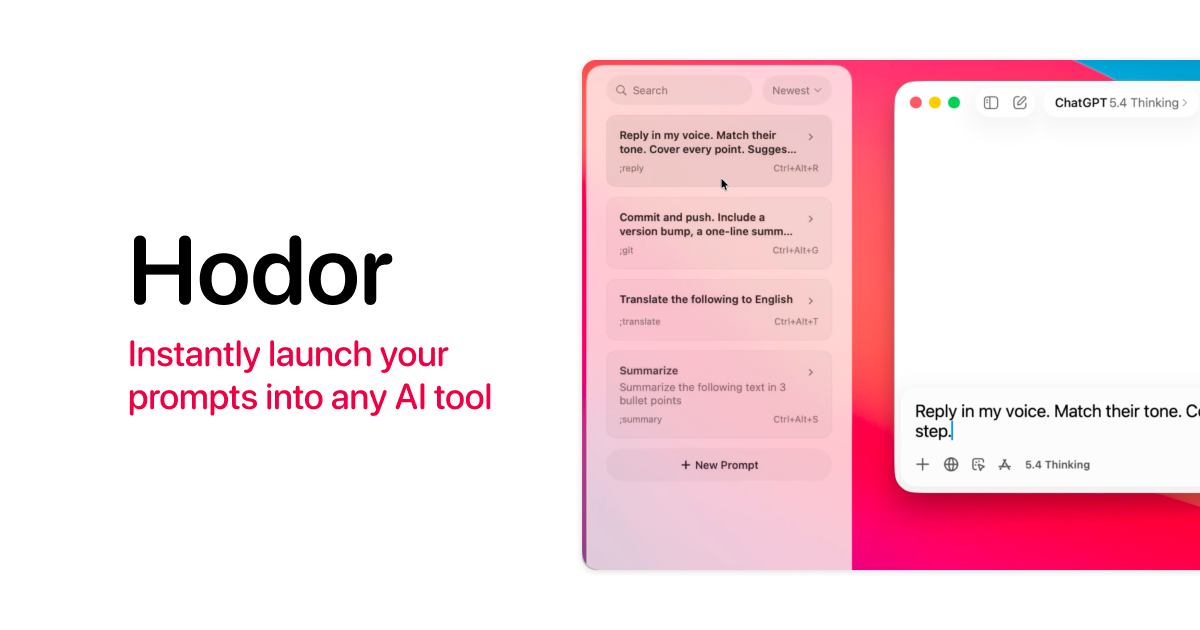
Hodor is a tiny macOS app that launches saved AI prompts into any text field — from the screen edge, keyboard shortcut, or keyword such as ;git.I work with different AI tools every day, and had prompts scattered across Raycast snippets, Apple Notes, and Notion — notes that kept getting longer and unmanageable. Raycast snippets are useful, but cumbersome to browse and edit. I wanted one local place to save and review them, and one click to paste them into whatever AI tool I'm using. The test I set was whether I could actually stop using Raycast snippets for this. I think I fulfilled my goal. Hodor has been my daily tool for 3 months now.The app is 701 KB — SwiftUI + SwiftData, no web views. Zero network requests anywhere in the code: no analytics, no telemetry, no update checks. You can verify - search the source for URLSession, it's not in code.Runs on macOS 15+, with native Liquid Glass on macOS 26+. Free and open source.GitHub: https://github.com/woody-design/hodorLet me know if you have any suggestions — I'd love to hear how you solved the scattered-prompts problem.
Comments (7)
tiny footprint is nice but raycast folks already have prompt extensions 🤷
curious about the text insertion method, accessibility API? that approach gets flaky in certain apps. also not seeing how this beats alfred snippets or raycast snippets which already do the same thing. the 701KB footprint is legit tho, most electron "launchers" are 10x that 🫤
Why not just use a text expander like Espanso? Does the same thing for free and works with more than just prompts. The semicolon keyword thing seems like a solution looking for a problem when snippet expanders already handle this reliably.
What's the accessibility approach for detecting text fields, AXObserver or something custom?
701kb is wild, most launchers bloat up fast
accessibility api or just clipboard paste with extra steps
swift or objc for the text field injection
Related Products

Lynxify.me
360-degree feedback software for small teams

Free Knitting Calculators: Gauge, Decrease & Yarn Tools (AI-Enhanced) | StitchMa
ThinkSpatial
Bookmark AI
Browser extension and dashboard to auto-tag and AI-search saved YouTube videos

IdeaGrit
pressure-tests your idea and helps you commit to the right hard thing.

RentalReady — Turnover Tracker
Turnover checklist and inspection tracker for short-term rental hosts.