 ComingUp
Gallery
About
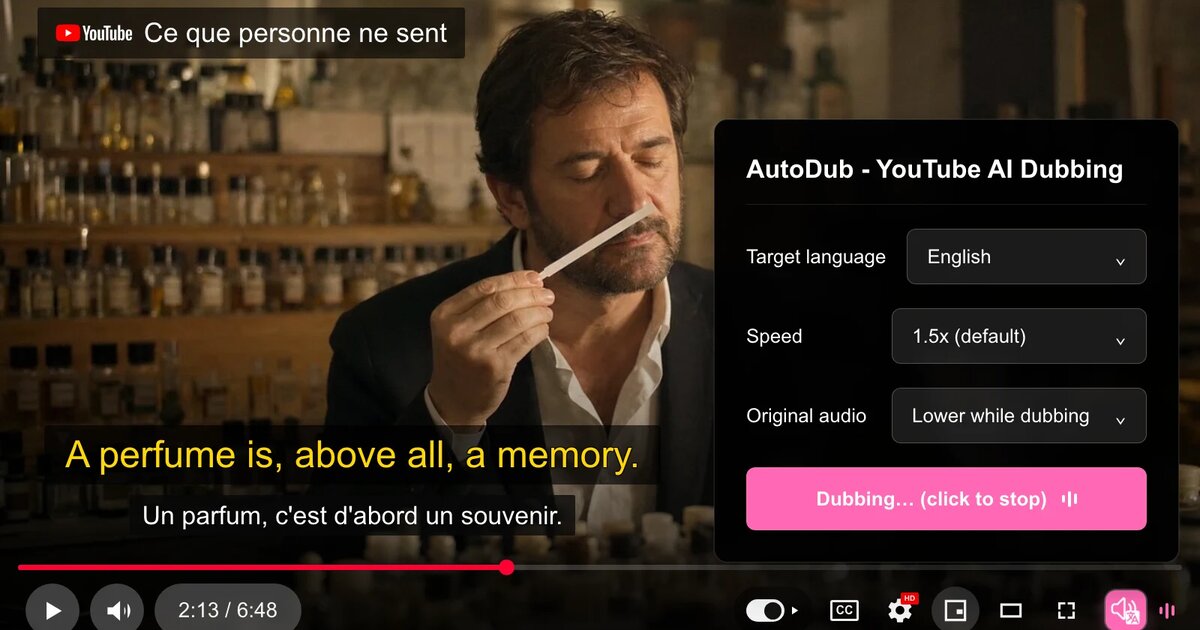
AutoDub is a free Chrome extension that translates YouTube videos and dubs them with an AI voice as they play. You hear the video in your own language instead of reading subtitles, and the translated subtitles still show on screen if you want to read along.★ Free. No sign-up, no daily video limit, no paywall. Install it, press play, and you're dubbing.How it works1. Install AutoDub and open a YouTube video that has captions (auto-generated captions work too).2. Click the AutoDub button in the player controls, then pick your language.3. Press play.Features- One-click translate & dub — the AutoDub button sits right in YouTube's player controls; press play and dubbing starts- Automatic source language detection. You only choose the language you want to hear, never the one the video is in.- Neural AI voices you can listen to for two hours straight, which is the whole point of a lecture or a podcast.- Choose your voice: male and female options for every language, 90+ voices in all. English comes in US and UK accents.- Translation happens while the video plays. A video that has been dubbed before starts right away.- Dubbing that stays in sync through pausing, seeking and 2x playback.- Voice speed from 0.5x to 2x, set separately from the video speed.- Translated subtitles on screen. Leave YouTube's own captions on and you get both languages at once.- Original audio stays under your control: keep it as it is, or have AutoDub lower it while the voice speaks.- Chrome, Edge, Brave and other Chromium browsers. There is a Firefox build on Firefox Add-ons.Dub YouTube into 42 languages:English · Spanish (Español) · Portuguese (Português) · French (Français) · German (Deutsch) · Italian (Italiano) · Dutch (Nederlands) · Polish (Polski) · Swedish (Svenska) · Danish (Dansk) · Norwegian (Norsk) · Finnish (Suomi) · Russian (Русский) · Turkish (Türkçe) · Arabic (العربية) · Hindi (हिन्दी) · Thai (ไทย) · Vietnamese (Tiếng Việt) · Japanese (日本語) · Korean (한국어) · Chinese Simplified (简体中文) · Chinese Traditional (繁體中文) · Indonesian (Bahasa Indonesia) · Malay (Bahasa Melayu) · Filipino · Bengali (বাংলা) · Urdu (اردو) · Tamil (தமிழ்) · Telugu (తెలుగు) · Marathi (मराठी) · Gujarati (ગુજરાતી) · Kannada (ಕನ್ನಡ) · Malayalam (മലയാളം) · Cantonese (廣東話) · Persian (فارسی) · Ukrainian (Українська) · Czech (Čeština) · Hungarian (Magyar) · Romanian (Română) · Greek (Ελληνικά) · Slovak (Slovenčina) · Hebrew (עברית)Good for- Lectures, online courses and coding tutorials, where you need your eyes on the slides or the code rather than on a subtitle line.- Long interviews and podcasts.- Documentaries, news and video essays.- Creators, travel and gaming videos from countries whose language you don't read.- Anything you watch while cooking, commuting or fixing something, when you're only half looking at the screen.- Language practice. Listen in your language and read the original captions, or do it the other way round.Website: https://autodub.net
Comments (2)
ai voice quality will decide if this is actually usable
does it mute the original audio or just talk over it?
Related Products

Qavvali Wiki
AI Model Idle
Twixt: Daily Word Puzzle

CAVN AI | AI Music Generator
CAVN AI is an innovative platform that allows users to generate music
TarotGuide
TarotGuide offers AI-powered tarot readings, multiple spreads, 78 card meanings,
Bookmark AI
Browser extension and dashboard to auto-tag and AI-search saved YouTube videos